
Use case · Accounting
Reconciliations that don't take all afternoon
Attach the bank statement and the ledger export and ask what doesn't match. GPTExcel lines up the transactions, flags duplicates and gaps, and hands back a workbook you can file.
See it work
Accounting, start to finish
A replay of the real app on sample data. Pick a prompt and watch it answer.
Try a prompt
Click one to watch GPTExcel answer it.
Step 1
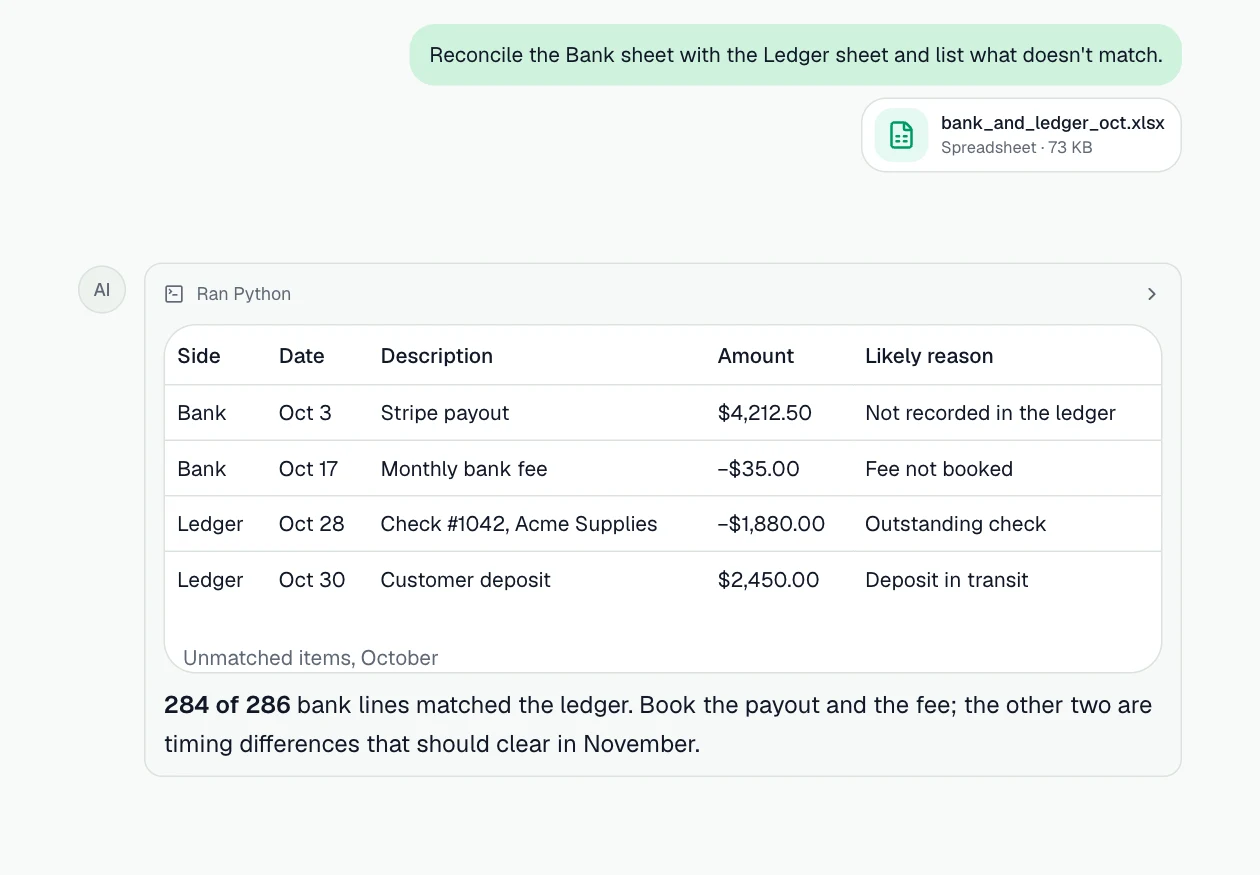
Reconcile the bank with the ledger
Every bank line matched to the ledger, and the leftovers explained.
Prompt: “Reconcile the Bank sheet with the Ledger sheet and list what doesn't match.”
Step 2
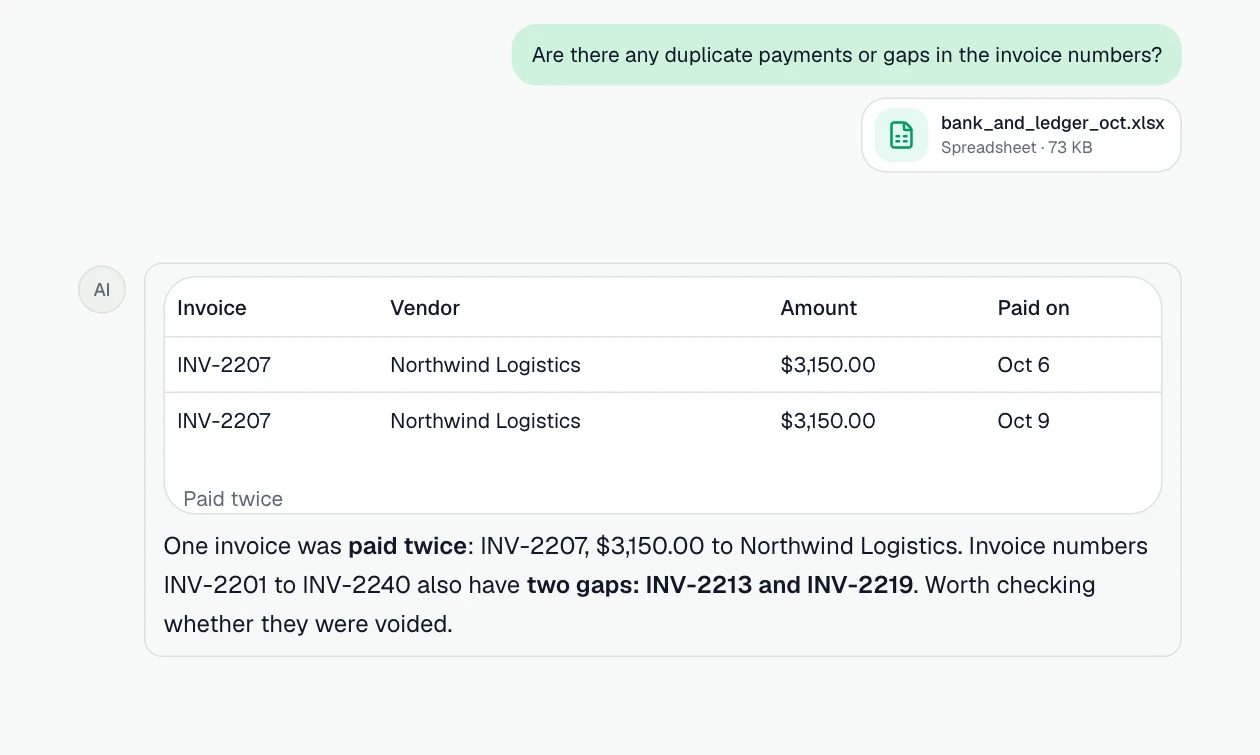
Catch duplicates and gaps
Payments made twice and missing invoice numbers, before they cost money.
Prompt: “Are there any duplicate payments or gaps in the invoice numbers?”
Step 3
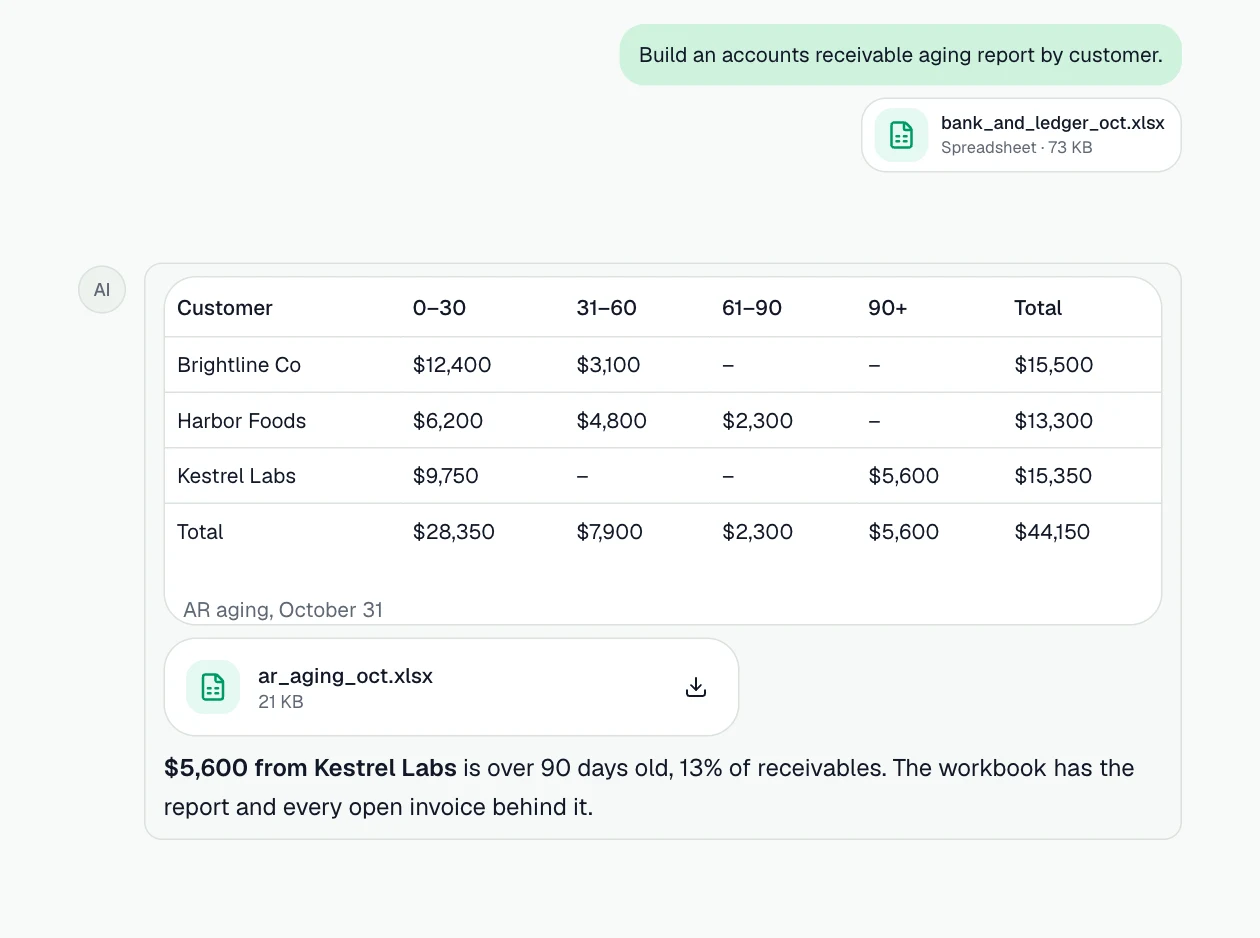
Build an aging report
Receivables by customer in 30-day buckets, as a workbook to file.
Prompt: “Build an accounts receivable aging report by customer.”
What you can do
More jobs it handles
Each one starts with a sentence like the one on its card.
Reconcile two exports
Match bank lines to ledger entries by amount, date and reference, and list what's left over.
Example prompt: “Reconcile the bank statement with the ledger. List unmatched items on each side.”
Find duplicates and gaps
Duplicate invoices, missing invoice numbers and payments posted twice.
Example prompt: “Find duplicate invoices and any gaps in the invoice number sequence.”
Build an aging report
Receivables or payables bucketed by 30, 60 and 90 days, by customer or vendor.
Example prompt: “Build an accounts receivable aging report with 0–30, 31–60, 61–90 and 90+ day buckets.”
Clean an export before importing
Fix dates stored as text, split columns, standardize names and remove blank rows.
Example prompt: “Clean this export: fix the dates, trim names, and remove blank and total rows.”
Get the formula, not just the answer
XLOOKUP, SUMIFS and dynamic arrays written for your columns and explained.
Example prompt: “Write a formula that sums column D when column B is 'Travel' and the date is in Q3.”
Audit a workbook
Spot hard-coded numbers, broken references and inconsistent formulas across a sheet.
Example prompt: “Check this workbook for errors, hard-coded values in formulas and inconsistent rows.”
How it works
- Step 1
Bring the data
Attach Excel or CSV files, add them from Google Drive or OneDrive, or attach a connected PostgreSQL database.
- Step 2
Ask in plain English
Describe what you need. GPTExcel reads the data, runs the analysis and shows how it got each number.
- Step 3
Take the result with you
Download the workbook, pivot tables or slide deck, save it to your drive, or save the steps as a workflow.
The features behind it
Chat with your files
Ask about Excel, CSV and TSV files in plain English and get answers grounded in the data.
Formulas you can reuse
Get the Excel or Google Sheets formula behind an answer, explained step by step.
Python in a sandbox
Cleaning, statistics and models run as real Python (pandas, SciPy, statsmodels, scikit-learn), and you can read the code.
Pivot Builder
Native Excel pivot tables, slicers, timelines and pivot charts from one sentence.
Google Drive and OneDrive
Add files from your drive and save results back as a file or a Google Sheet.
Workflows
Save a multi-step task once, then run it on next week's file, in the background or on a schedule.
Questions
- Is client data safe to upload?
- Files are encrypted in transit and at rest, your chats are private unless you share a link, and your data is never used to train AI models. See the Privacy Policy for details.
- What if I only have a screenshot of a statement?
- It works best with Excel and CSV exports. GPTExcel can also turn an image of a table (PNG, JPG, WebP) into a spreadsheet; check the extracted figures before relying on them.
- Does it replace my accounting software?
- No. It works on the files your accounting software exports, for the analysis and checks you'd otherwise do by hand in Excel.