
Use case · Education
Learn Excel by asking
Ask how a formula works and get it explained step by step. Analyze data for a project and see the method behind every number. Teachers can tidy grade books and summarize results in minutes.
See it work
Students and teachers, start to finish
A replay of the real app on sample data. Pick a prompt and watch it answer.
Try a prompt
Click one to watch GPTExcel answer it.
Step 1
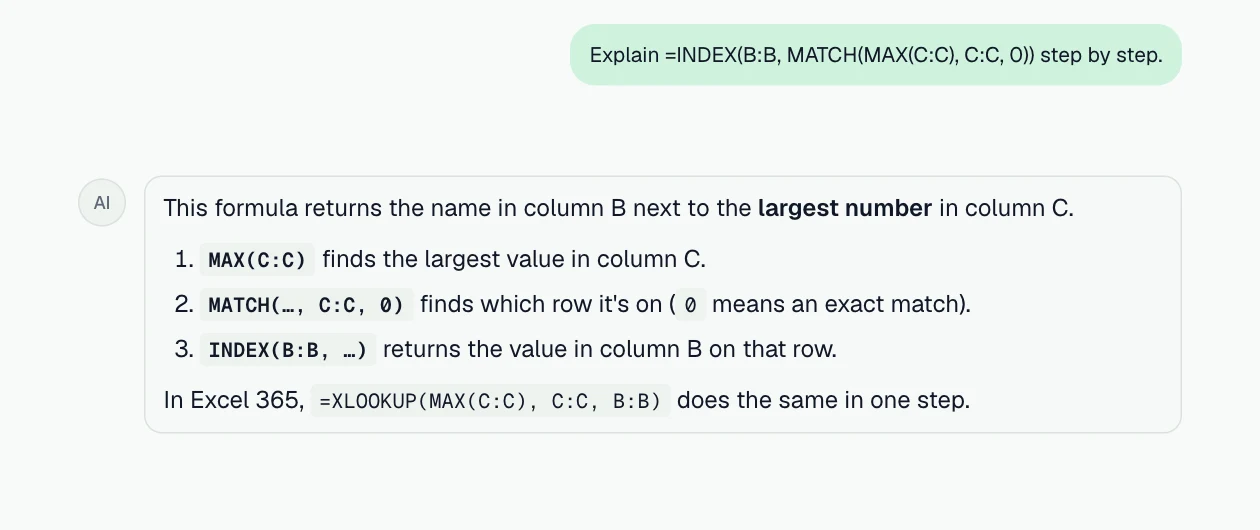
Understand any formula
A formula broken down piece by piece, in plain English.
Prompt: “Explain =INDEX(B:B, MATCH(MAX(C:C), C:C, 0)) step by step.”
Step 2
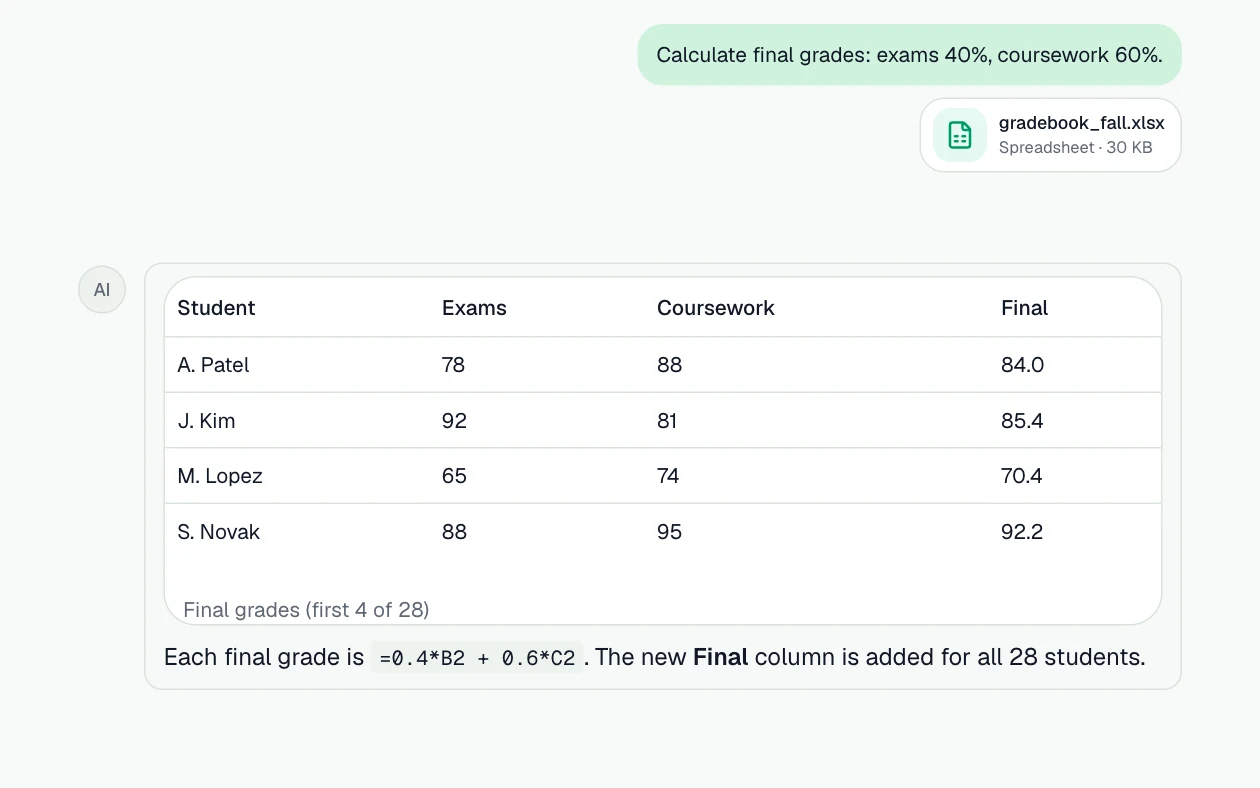
Weighted final grades
Exams and coursework weighted, with the formula to reuse.
Prompt: “Calculate final grades: exams 40%, coursework 60%.”
Step 3
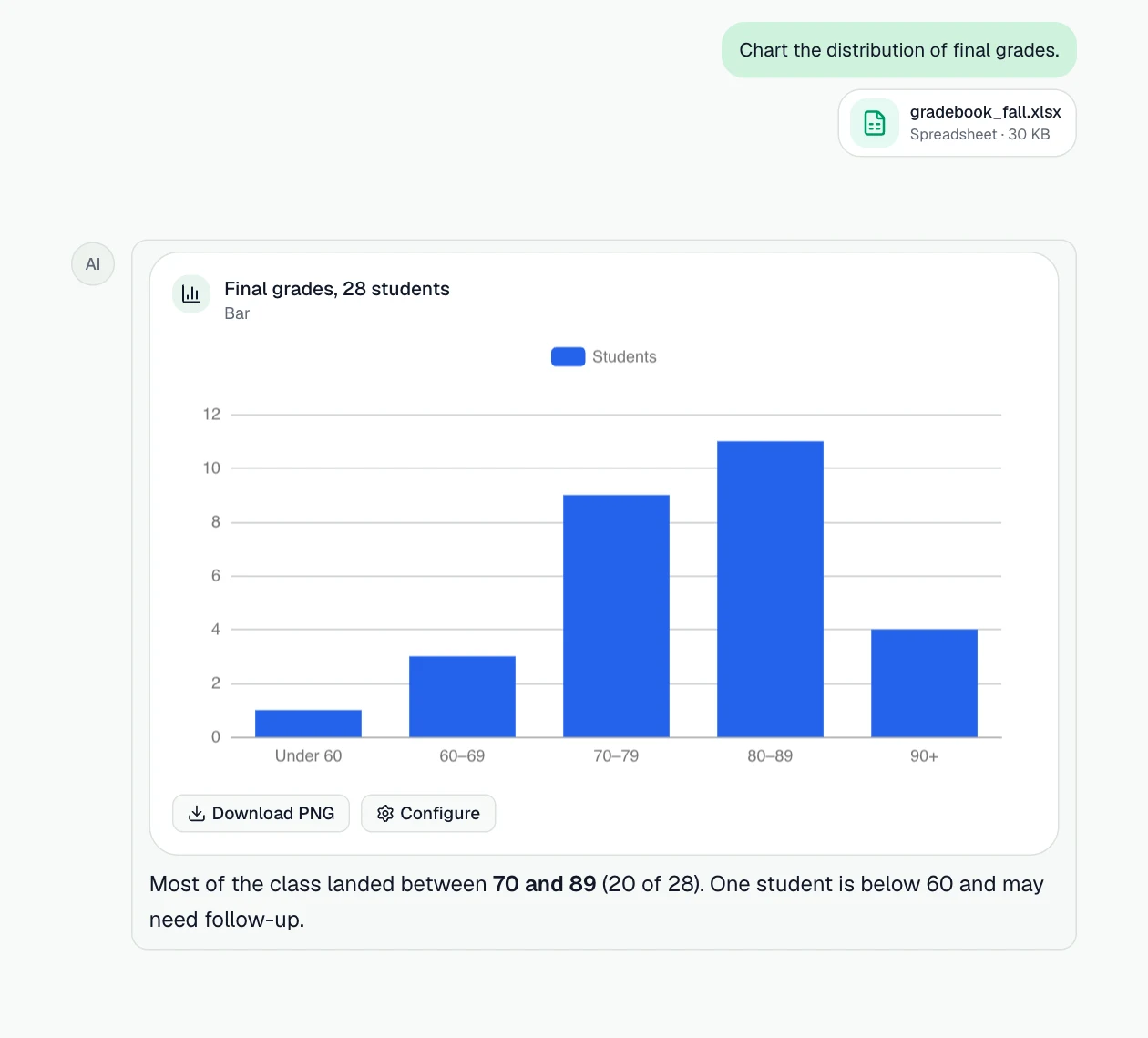
See how the class did
The grade distribution as a chart, for feedback or a report.
Prompt: “Chart the distribution of final grades.”
What you can do
More jobs it handles
Each one starts with a sentence like the one on its card.
Understand a formula
Any formula broken down piece by piece, in plain English.
Example prompt: “Explain what =INDEX(B:B, MATCH(MAX(C:C), C:C, 0)) does, step by step.”
Analyze data for a project
Descriptive statistics, charts and a short write-up of what the data shows.
Example prompt: “Give me descriptive statistics for this survey and chart the answers to question 3.”
Check your statistics
Run the test you chose and see whether the result holds, with the method explained.
Example prompt: “Run a t-test on these two groups and explain the result in plain words.”
Grade book and results
Averages, weighted grades, distributions and who needs attention.
Example prompt: “Calculate weighted final grades (40% exams, 60% coursework) and chart the distribution.”
How it works
- Step 1
Bring the data
Attach Excel or CSV files, add them from Google Drive or OneDrive, or attach a connected PostgreSQL database.
- Step 2
Ask in plain English
Describe what you need. GPTExcel reads the data, runs the analysis and shows how it got each number.
- Step 3
Take the result with you
Download the workbook, pivot tables or slide deck, save it to your drive, or save the steps as a workflow.
The features behind it
Formulas you can reuse
Get the Excel or Google Sheets formula behind an answer, explained step by step.
Chat with your files
Ask about Excel, CSV and TSV files in plain English and get answers grounded in the data.
Python in a sandbox
Cleaning, statistics and models run as real Python (pandas, SciPy, statsmodels, scikit-learn), and you can read the code.
Charts in the chat
Bar, line, area, scatter, pie, heatmap and radar charts drawn in the chat, and anything else through Python.
Slide Deck Builder
Turn the analysis into a presentation with native charts, as PowerPoint or PDF.
Questions
- Is there a free plan?
- Yes. The free plan needs no credit card and includes a monthly allowance of chat messages.
- Does it work for Google Sheets too?
- Yes. Ask for a Google Sheets formula and you'll get one written for Sheets.