Use case · Data science
Data science without the setup
Hand GPTExcel a dataset and a question. It writes the Python, runs it in a private sandbox, and shows you the result, the chart and the code. Pull data straight from PostgreSQL when it doesn't fit in a spreadsheet.
See it work
Data science, start to finish
A replay of the real app on sample data. Pick a prompt and watch it answer.
Try a prompt
Click one to watch GPTExcel answer it.
Step 1
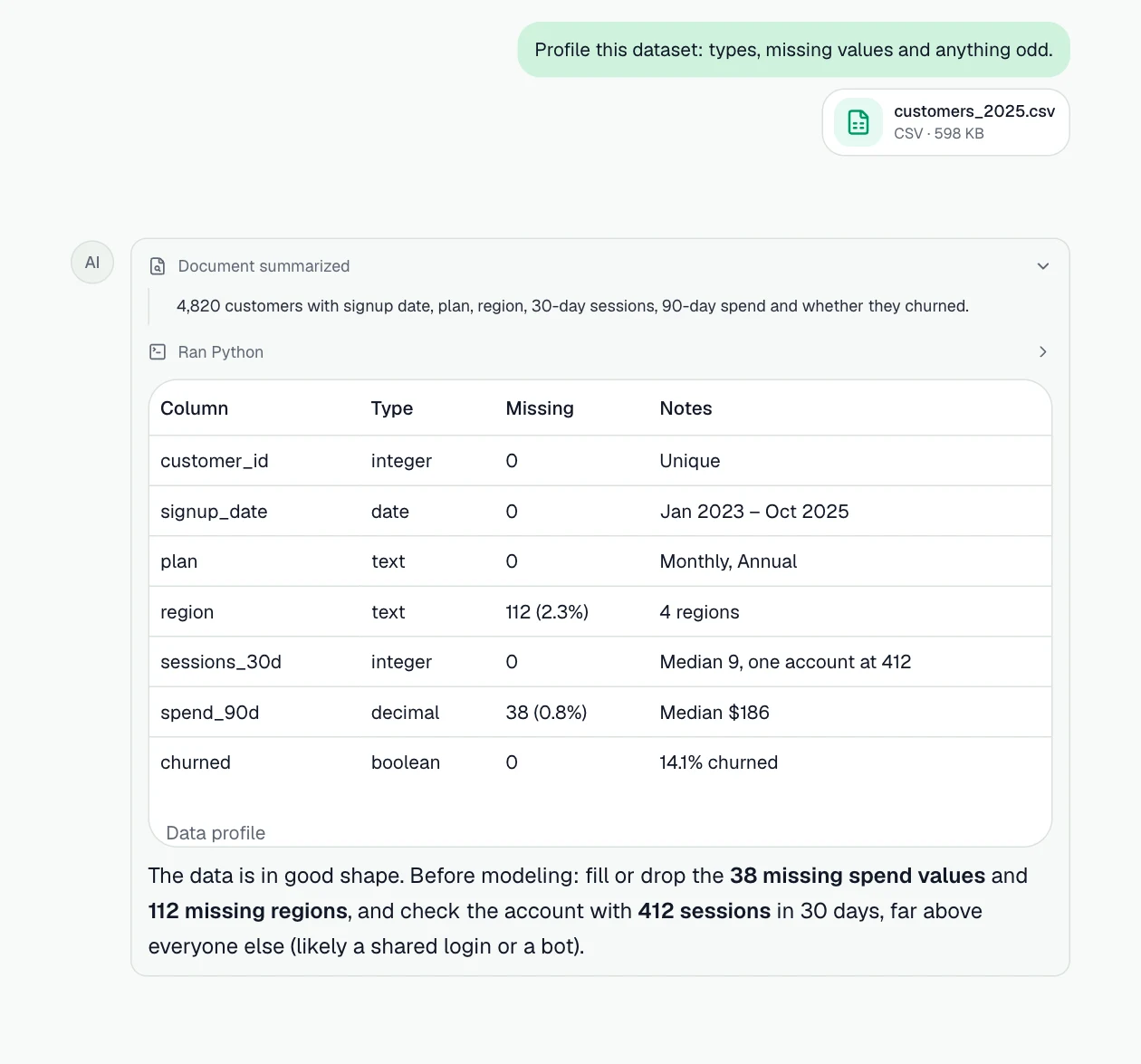
Profile a dataset before you trust it
Types, missing values and outliers, checked in Python before any analysis.
Prompt: “Profile this dataset: types, missing values and anything odd.”
Step 2
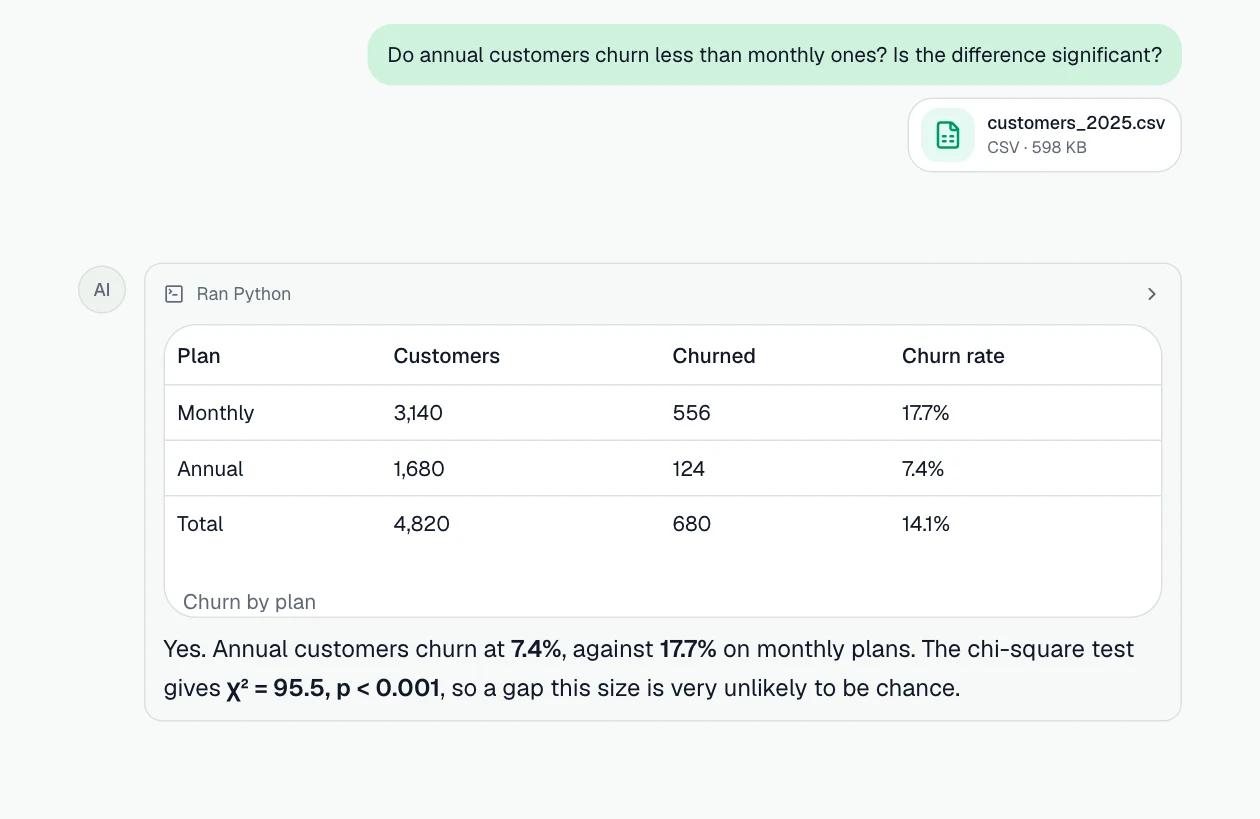
Test a hypothesis
A chi-square test with SciPy, and what the result means in plain words.
Prompt: “Do annual customers churn less than monthly ones? Is the difference significant?”
Step 3
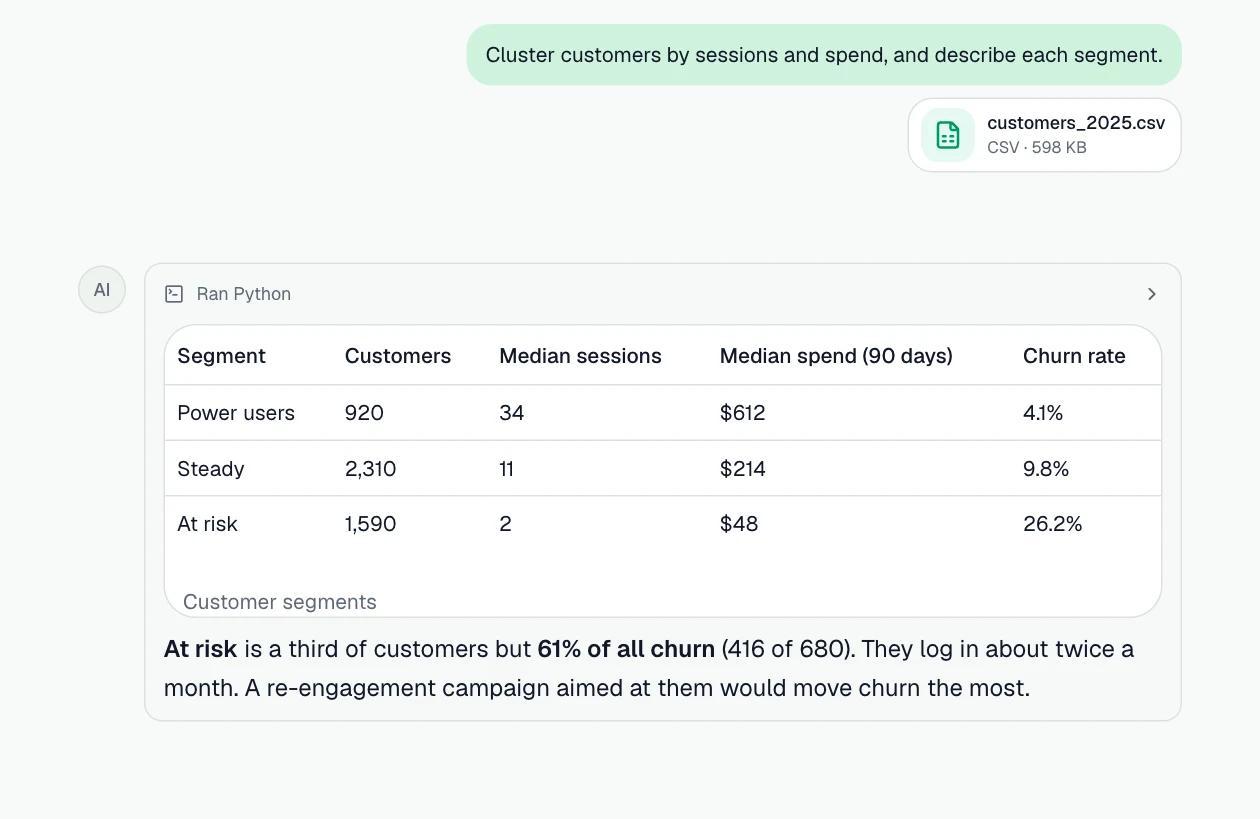
Segment customers with a model
k-means clustering with scikit-learn, with each segment described.
Prompt: “Cluster customers by sessions and spend, and describe each segment.”
What you can do
More jobs it handles
Each one starts with a sentence like the one on its card.
Profile a new dataset
Column types, missing values, duplicates, ranges and outliers before you trust a number.
Example prompt: “Profile this dataset: types, missing values, duplicates, and any outliers worth checking.”
Test a hypothesis
t-tests, chi-square, correlations and confidence intervals with SciPy and statsmodels, explained in plain words.
Example prompt: “Is the difference in conversion rate between variant A and B statistically significant?”
Fit a quick model
Regression, clustering or classification with scikit-learn, with the metrics and the features that matter.
Example prompt: “Cluster these customers by spend and frequency and describe each segment.”
Query the warehouse, not a CSV
Connect PostgreSQL (or Supabase, Neon) and ask. It reads only the tables you allow and never writes.
Example prompt: “From my analytics database, show weekly active users for the last 12 weeks.”
Export to Parquet and keep going
Large query results come back as a Parquet or CSV file that the Python sandbox reads directly.
Example prompt: “Export last quarter's orders to Parquet and summarize revenue by category.”
Chart it
Distributions, trends and comparisons drawn from the data, ready for a write-up.
Example prompt: “Plot the distribution of order values and mark the median.”
How it works
- Step 1
Bring the data
Attach Excel or CSV files, add them from Google Drive or OneDrive, or attach a connected PostgreSQL database.
- Step 2
Ask in plain English
Describe what you need. GPTExcel reads the data, runs the analysis and shows how it got each number.
- Step 3
Take the result with you
Download the workbook, pivot tables or slide deck, save it to your drive, or save the steps as a workflow.
The features behind it
Python in a sandbox
Cleaning, statistics and models run as real Python (pandas, SciPy, statsmodels, scikit-learn), and you can read the code.
PostgreSQL databases
Ask questions of Postgres, Supabase or Neon. Read-only, only the tables you choose.
Charts in the chat
Bar, line, area, scatter, pie, heatmap and radar charts drawn in the chat, and anything else through Python.
Chat with your files
Ask about Excel, CSV and TSV files in plain English and get answers grounded in the data.
Workflows
Save a multi-step task once, then run it on next week's file, in the background or on a schedule.
SQL Generator
Write, explain and optimize SQL for PostgreSQL, MySQL, SQL Server, BigQuery and more.
Questions
- Which Python libraries can it use?
- The sandbox has pandas, Polars, NumPy, SciPy, statsmodels, scikit-learn, Matplotlib, seaborn, Plotly and PyArrow, plus openpyxl and XlsxWriter for Excel files. It can pip install other packages from PyPI when a task needs one.
- Can I see the code it ran?
- Yes. Each Python step shows the code and its output, so you can check the method or reuse it.
- Can it change data in my database?
- No. Every statement is checked before it runs and runs in a read-only transaction, and it only sees the tables you choose. A read-only database user is recommended as well.
- Is my data used to train AI models?
- No. Your files and query results are used to answer you and are never used to train models.