
Generating SQL Queries for Diverse DBMS with GPTExcel: An All-Inclusive Guide
Unveil how GPTExcel’s AI-powered SQL query generator seamlessly creates complex SQL queries for a wide variety of DBMS, revolutionizing your database operations.

Baffled by complicated SQL queries? Seeking an effortless way to construct and execute SQL queries across various DBMS (Database Management Systems)? Say hello to GPTExcel, a remarkable AI-powered SQL query generator. GPTExcel facilitates efficient SQL query creation for a vast array of DBMS, thus making your database operations more productive and less demanding.
GPTExcel supports a host of DBMS, including SQL, SQLite, MySQL, MariaDB, PostgreSQL, Oracle DB, MS SQL Server, Microsoft Access, Amazon Aurora, Google Cloud SQL, CockroachDB, Apache Derby, IBM Db2, SAP HANA, Teradata, Informix, Sybase, Firebird, and Snowflake.
Let's explore how you can use GPTExcel to effortlessly generate SQL queries.
Unleashing the Power of GPTExcel: A User-friendly Approach
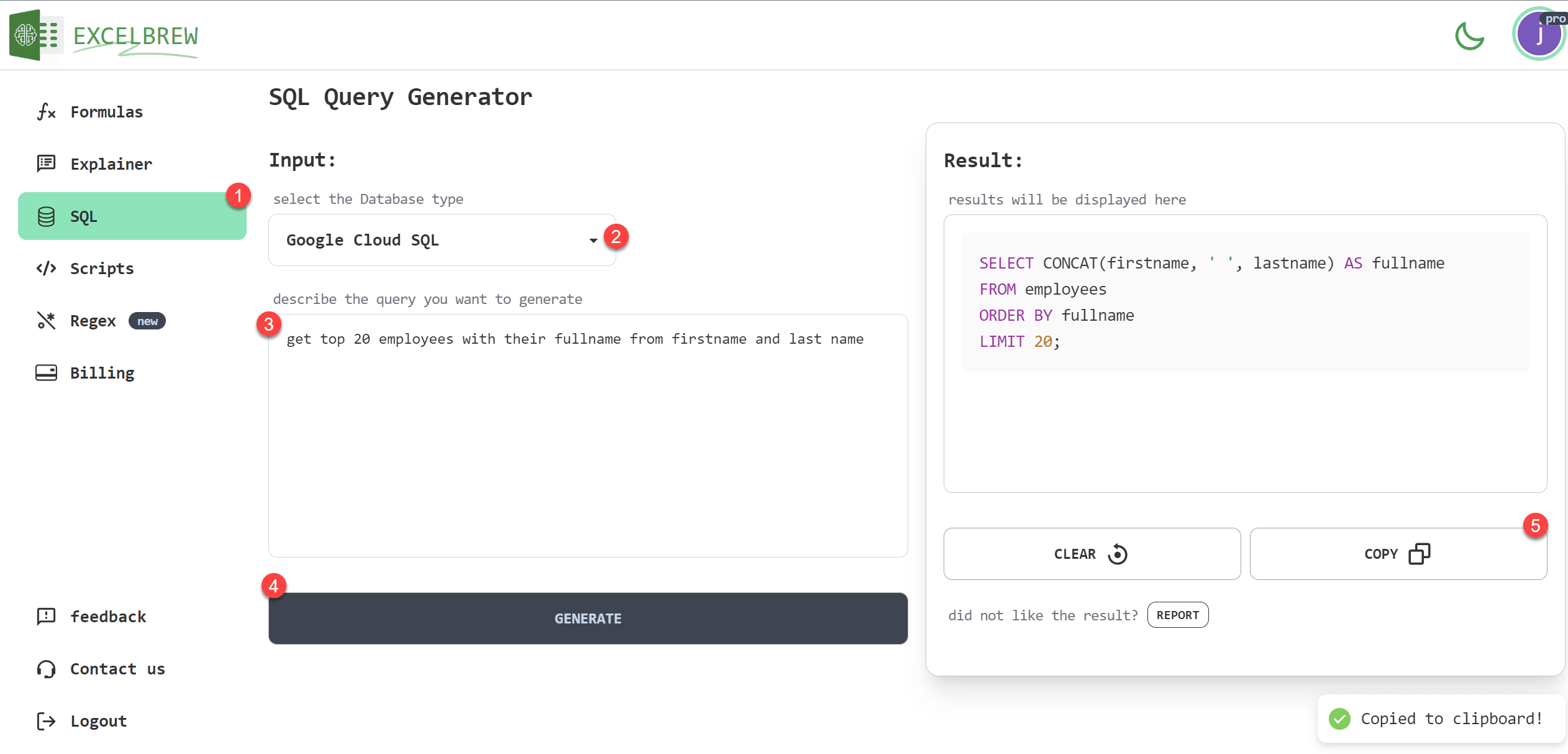
Step 1: Navigate to SQL Page
Initiate your journey towards seamless query creation by selecting 'SQL' from the navigation menu on the GPTExcel website.
Step 2: Choose Your DBMS
One of GPTExcel's dominant features is its extensive support for diverse DBMS. Choose your preferred DBMS from the list in the dropdown menu.
Step 3: Detail Your Prompt
Once you've identified your DBMS, type in your specific action or operation in the provided text input field.
Step 4: Click Generate
After you've adequately detailed your request, click 'Generate'. GPTExcel's smart AI assesses your request and creates an appropriate SQL query targeted to your needs.
Step 5: Copy and Use the Generated Query
GPTExcel supplies the generated SQL query with a single-click 'copy to clipboard' option. This allows you to swiftly integrate the query into your DBMS for immediate application.
GPTExcel is revolutionizing how database professionals interact with a wide range of DBMS. Shift from time-consuming manual query creation to efficient, AI-driven automation with GPTExcel.
Kickstart your transformative journey towards database efficiency with GPTExcel. Save time, streamline operations, and maximize your data utilization without the typical coding struggle.